mjryan1234
September 11, 2025, 2:18pm
1
In the latest release, you removed the “Initial Value” field from the list of variables in in Collection.
this DELETED data I used to manage my env.
Can we get that field add back, or can we get a comment field to use in its place?
Hey @mjryan1234
More information about the changes can be found here?
Variables power some of the most essential workflows in API development. They help you avoid hardcoding values, seamlessly switch between environments, and collaborate effectively with your team. That’s why they’ve become one of Postman’s most beloved features, used in everything from quick prototypes to enterprise-scale automated testing.
In recent releases, we’ve taken steps to make working with variables more transparent. For example, we introduced the variables pane, which shows you all the…
For adding comments/descriptions:
4. Context Through Descriptions Before : Variable names had to tell the whole story, or worse, use an initial value for descriptionAfter : Rich descriptions that document usage, source, and context
Perfect for onboarding new team members or managing complex environments with dozens of variables. Now your variables can be self-documenting.
Could you provide more context around any deleted data, please?
Your existing setup will work seamlessly. This update is fully backwards compatible. Here’s exactly how we handle it:
Variables with only a current value → Show in the Value field as UnsharedVariables with an initial value → Appear as Shared in the new interfaceWhen the initial value = current value → The current value shows in the Value field as SharedWhen initial ≠ current values → Value field displays the current value, marked with an “Edited” state for your reviewSecrets → The value is masked, as it was before.
Your collections, environments, and scripts will continue working exactly as they did before. No migration required.
mjryan1234
September 11, 2025, 2:41pm
3
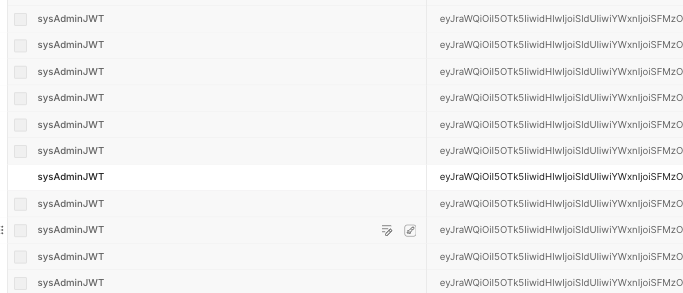
because of the deleted field I can not distinguish between these variables - see image
Did you previously use the initial column as a method to add a comment or note about the cluster as a way of noticing this?
If this was a comment, could that be added to the description field?
Are you able to still see that value when you hover over the edited state icon in the Value field?
mjryan1234
September 11, 2025, 2:54pm
5
In terms of seamless, how is “deleted data” seamless?
If Im not looking in the right place let me know.
mjryan1234
September 11, 2025, 2:55pm
6
Yes, as description/comment/info field, but it needs to be displayed not by hovering.
You can add the comment using the description icon in the variable name field, for it to be displayed all the time.
This obviously isn’t an ideal situation when you have many variables.
There could be a method using the the Postman API to copy the initial values over to the description field to automate the process. I’ll check this and get back to you.
Is there a way to get the data of initial value back ? I have quite some important data saved in that column, and now I’m not able to see them.
If you hover over the Edited icon of the value field, the data is still contained in there.
This extract shows how and where the data from the old columns is placed in the new experience:
Your existing setup will work seamlessly. This update is fully backwards compatible. Here’s exactly how we handle it:
Variables with only a current value → Show in the Value field as UnsharedVariables with an initial value → Appear as Shared in the new interfaceWhen the initial value = current value → The current value shows in the Value field as SharedWhen initial ≠ current values → Value field displays the current value, marked with an “Edited” state for your reviewSecrets → The value is masked, as it was before.
Your collections, environments, and scripts will continue working exactly as they did before. No migration required.