Postman CLI inconsistency

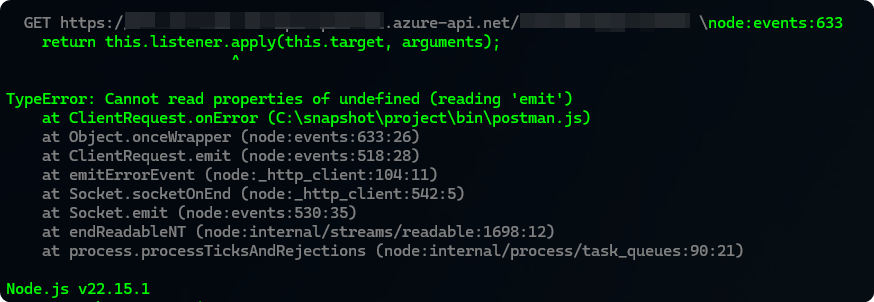
I’m seeing an issue with Postman CLI (v.1.19.4) where a request is failing with the error below.

If I make the same request with the Postman desktop client, it works. Has anyone else seen this type of issue?

The odd thing is, I make a POST to the same endpoint in the previous step and its successful.

1 Like

Hey @cruxto :waving_hand:

Is this the same on the latest version v1.20.0?

Have the version of node that you’re using in that pipeline recently been updated?

Cheers @danny-dainton , I’ll update the CLI.
No we have not changed the version of node recently.

Hopefully it fixes it, as it will be a massive help with what I’m currently working on :slight_smile:

1 Like

Let us know if that helps things, i’ll reach out to the team to see if they have seen this error before.

Hopefully between us we can get to the bottom of it! :folded_hands:

Hi @danny-dainton I’ve just installed the latest version 1.21.0

I have the same error, unfortunately,

I think it could be a network related issue, as when I run it on my personal machine, it works. I’ve had a ticket open for several months on a similar issue where I can run a pack in Postman Desktop but not CLI,

CLI seems to be coming on leaps and bounds now, which is great to see. Just wish it had parity with the desktop.

Thanks for trying, Danny.

You’re welcome - Is the ticket you have open with Postman or on your side about the Network issues?

Which features would you like to see in the CLI?

I don’t believe it’s ever going to have full parity with the Desktop Client but it’s improving all the time. :heart:

The issue is with Postman (235396). As the desktop client is working 100%, the CLI is not working the same with some of the test we have.

To be clear, this is when I run the test on the same machine, Desktop and CLI.

That’s the feature I would like to see. If I write a test in Postman desktop, I want to be able to run it with Postman CLI without any issues.

Cheers

1 Like

Hi

Based on the symptoms you’re describing (works in Desktop on work machine, works on personal machine, but fails in CLI on work machine), this could be related to proxy environment variables.

Can you check the following on the machine which has the issue:

  1. Check your no_proxy / NO_PROXY environment variable:

    • do you have anything configured ? are they accurate ?
  2. Check your other proxy-related environment variables:

    • http_proxy, https_proxy, HTTP_PROXY, HTTPS_PROXY

    • What values are configured? are they accurate ?

  3. Test with cURL from the same machine:

   curl -v https://your-api-endpoint.com/your-path
  • Does this succeed or fail?

The CLI respects system environment variables by default, and if there’s a mismatch in proxy configuration, it could cause connectivity issues that might explain the behaviour you’re seeing.

Also, if you’re using a different proxy setup (instead of standard environment variables), please share some details as it might help us suggest the appropriate next steps.
2 Likes

Thanks @aviation-geoscienti1 for the info, I can see the request fails when using curl. So I’ve raised the ticket to investigate the issue.

I don’t get why Postman Desktop works fine with the same proxy settings.

Thanks again.