Exploring Postman’s Agent Mode? You’re in the right place. This is your go-to space for quick, practical insights to help you get the most out of it.
Here’s how it works:
Every Tuesday and Thursday, we’ll share new Agent Mode Tips right here. Each one’s short, actionable, and designed to help you level up quickly covering everything from getting started and debugging to using skills and automating your workflows.
We’d love you to be part of it. Share your own tips, screenshots, or any clever use cases in the replies. If you’ve found a unique way to use Agent Mode, tell us about it we might feature your idea in a future post.
Let’s make this thread the go-to place for mastering Agent Mode together.
Tip #1 Create a new Collection with Examples
Starting from scratch? You can easily create a new Collection directly in Agent Mode to explore APIs, prototype ideas, or run local workflows.
Prompt:
Create a complete Library API Collection which includes:
- CRUD based operations
- A
baseUrl placeholder for the API
- Request and Response Examples
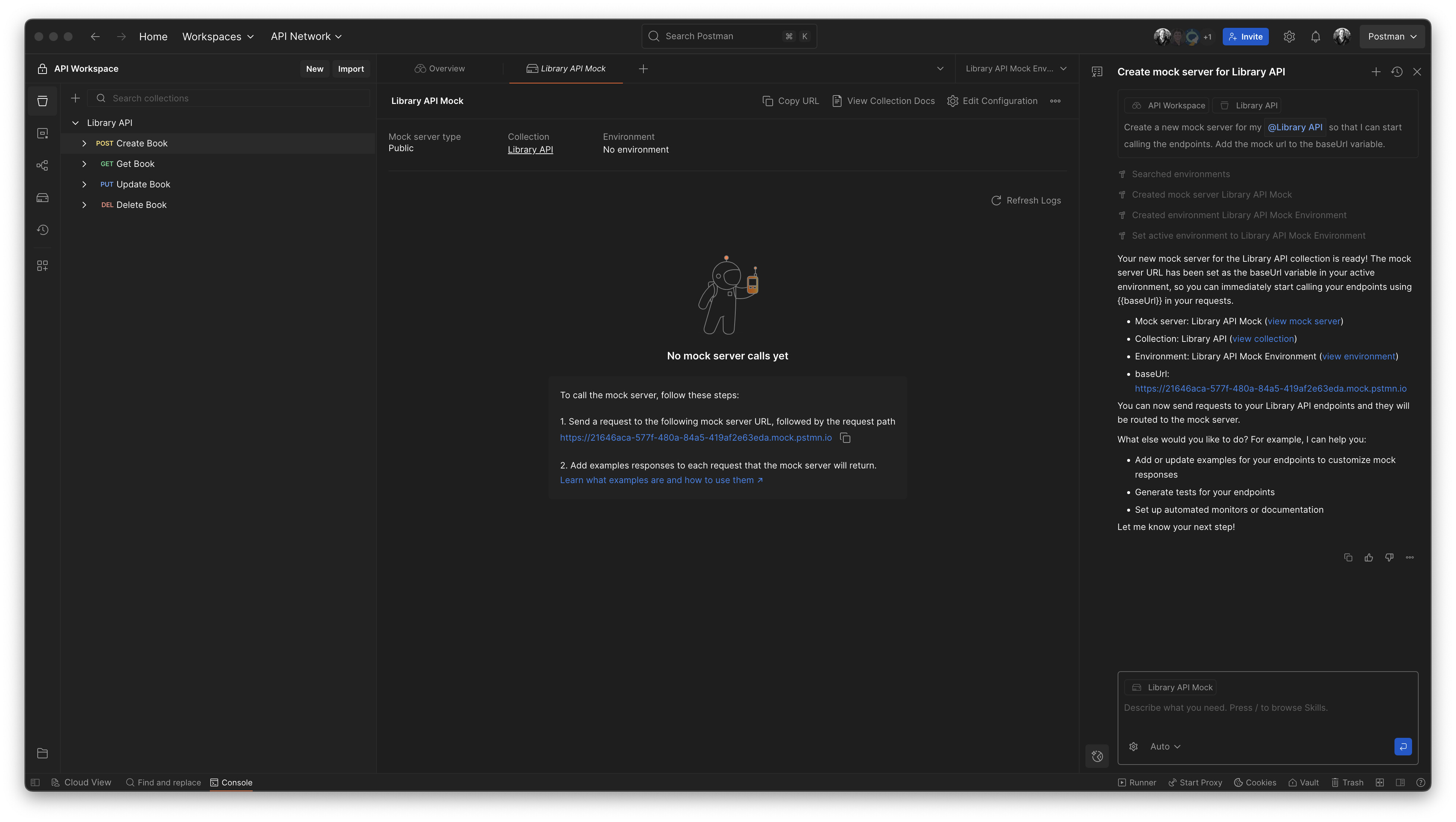
Tip #2 Create a Mock Server in Agent Mode
Need to test your API before the backend’s ready? Try creating a Mock Server directly in Agent Mode. It’s a simple way to simulate real responses using your existing Collection’s Examples, perfect for developing and testing without waiting for live endpoints.
Prompt:
Create a new mock server for my @Library API so that I can start calling the endpoints. Add the mock url to the baseUrl variable.
Tip #3 Adding Tests to a Collection
With Agent Mode, you can add and run tests. Use pm.test() scripts to validate your endpoints locally and catch issues early.
Prompt:
Create a set of tests for each endpoint in my collection. Run the tests using the Collection Runner once that have added to the Collection and provide a summary of the results.
Tip #4 Debugging a Test Failure with Agent Mode
Got a failing test? Agent Mode provides detailed logs right where you’re running your requests. Use these insights to debug faster and identify the root cause with ease.
Prompt:
Can you help locate and fix the test error?
Tip #5 Fork a Collection with Agent Mode
Need to experiment without affecting the main Collection? Fork it! Agent Mode makes it simple to clone and test locally, so you can explore and iterate safely.
Prompt:
Create a Fork of the @Library API collection in this Workspace. The fork name should be “development”.
Once created, open the “Get Book” request in the forked Collections so I can start making changes straight away.
Tip #6 Create a Pull Request summarising the forked Collection changes with Agent Mode
Once you’ve made changes and tested your forked Collection, open a Pull Request. Agent Mode can even summarise your changes automatically, saving you time and keeping things clear for reviewers.
Prompt:
For this Forked @Library API Collection, Create a Pull Request to add the changes to the @Library API source Collection. Include a Title and details summary of the changes made. Add Hemendra as the reviewer.
Tip #7 Create Documentation for your Collection
Keep your team perfectly aligned by automatically generating clear, consistent documentation right from Agent Mode. Reduce manual effort, prevent knowledge gaps, and make sure everyone stays on the same page as your APIs and processes change.
Prompt:
Create full and comprehensive documentation for the @Library API Collection, including all requests.
Include details about any authentication method used, if required.
If variables are used in the Collection, create a table at the Collection level description show what these are and what value is required.
Tip #8 Set up Monitors for your Collections using Agent Mode
Set up monitors in Agent Mode to keep an eye on your APIs. It’s ideal for testing stability, identifying regressions early, and maintaining confidence in your endpoints.
Prompt:
Create a new Monitor for the @Library API collection, this should be setup to run at 3pm every Tuesday.
Once the Monitor has been created, run it for the first time so that I can see the results
Tip #9 Using “Skills” in Agent Mode
Skills make Agent Mode even smarter. Try built-in options like the Validate Collection Quality skill to gain insights into structure, naming conventions, and best practices in your Collections.
The Run Health Check skill runs the Collection in the Collection Runner, reviews the results, and generates a comprehensive health-check report.
Tip #10 Provide Context to your Agent Mode prompts
Want Agent Mode to better understand your use case? You can attach elements such as collections, folders, requests, environments, local files or API specs to give it extra context before running commands.
Tip #11 Agent Modes Auto-run vs Manual approval
Use Auto-run to let Agent Mode carry out the requested tasks automatically, or switch it off if you prefer to review and approve each action manually.
Tip #12 Configure and use MCPs with Agent Mode
You can add MCP servers from the Agent Mode settings under the “Configure MCP servers” option.
This opens the MCPs available for your Internal Services and gives you access to the Full MCP Catalog from the Public API Network.
Once you have your MCP servers connected, you can use all of their available tools directly through the Agent Mode prompt.
Tip #13 Audit and refactor an existing test suite using Agent Mode
An Agent Mode led audit of your test suite can uncover unnecessary assertions, highlight duplication, and restructure repeated checks so they live at the collection level instead of inside every request.
Eliminate clutter and reduce maintenance so you can update faster, avoid errors, and trust your tests with greater confidence.
Prompt:
Audit and refactor my test suite in the @Library API Collection to remove redundant assertions and suggest recommendations for repeated tests that could be moved to the collection level and run against each request.
Tip #14 Create new Environments and pre populate these with variables using Agent Mode
Use Agent Mode to create a staging and production environment, define placeholder variables, and add new common variables to an existing local environment.
Prompt:
Create 2 new environments for staging and production. These should both have the variable baseUrl but only have a placeholder in the value. I would also like to update the @Library API Mock Environment with a username value of “Danny” and replicate this in the newly created environments.