🤖 $200 Challenge – Agent Mode Time Saver Edition | 24 Hours Only

The weekly community challenge is live! One winner will take home $200 cash.

Prompt:
Share one place in your workflow where Agent Mode replaced a multi-step manual process. What was the long way? What does AM do in one step? And roughly how much time did this save you?

It could be cleaning up a request, rewriting something messy, fixing variables, repeating something across environments, or any little chain of actions AM now handles for you.

How to enter:
Reply to this thread within the next 24 hours with your example.
Bonus: Add a quick screenshot or GIF if it helps show the difference.

Once you’ve posted, head over to Discord → #weekly-challenge to compare time-savers and talk through what surprised you most.

Prize: $200 cash
Deadline: Thursday at 10:00 am BST / 2:30 pm IST
Winner announced: Friday right here and live on Discord

Why join the Discord chat?
That’s where people share quick reactions, vote with emojis, and talk through their discoveries in real time. If you haven’t joined yet, get in here.

link: https://bit.ly/3XITIYN


This contest is open worldwide to participants 18+. By entering, you grant Postman the right to feature your submission on our website, blog, and social channels.


Agent Mode December Contest

This December, we are also hosting an Agent Mode contest, and we are giving out up to $600 in prizes. It is open to everyone!

Show us what you’ve built with Agent Mode in #agent-mode-contest on Discord to stand a chance!

:point_right: Read More about it here

3 Likes

Prompt: “Perform a full ‘Production Readiness’ refactor: replace hardcoded values with variables, rename requests for consistency, and inject PII-scanning security tests into every endpoint.”

The Long Way: I recently inherited a “spaghetti code” collection from a hackathon hardcoded localhost URLs, messy request names, and zero tests. Cleaning this up manually is the worst part of the job. I would have to:

  1. Click into 15+ requests and manually cut-paste URLs into the Environment tab.
  2. Rename every request one by one.
  3. Copy-paste the same “Response Time < 400ms” test script 15 times. It’s a 2-hour “janitorial” task that usually kills my momentum.

What AM does in one step: Agent Mode didn’t just type for me; it acted as a Lead Engineer. In roughly 45 seconds, it analyzed the traffic patterns to standardize my variables, renamed the messy requests (e.g., changing “test_1” to “Create Payment”), and populated the Tests tab with actual security logic to catch data leaks. It turned a “prototype” into “production-ready” artifacts instantly.


I also tried generating Mcp server with Agent mode and it excelled it
I pointed it at my existing Payment API and asked for an MCP Server. It instantly generated the full index.ts file, complete with tool definitions (search_transactions, create_charge), argument validation (Zod), and the execution handlers. It turned my standard API into an Agent-ready interface instantly.

1 Like

Agent Mode: Automated Environment Variable Cleanup

In my API workflow, I had multiple Postman collections and environments all referring to the same endpoint by different names. For example, some used baseURL, others used base_url or apiUrl for the API base address. In a typical Postman setup, environments are simply sets of key-value pairs that parameterize requests (e.g. API endpoints) for each context. In practice, my inconsistent naming meant I spent a lot of time manually reconciling these keys. Every time I changed the API design or added a new collection, I had to go through each environment and collection to rename variables and update references. This turned into dozens of tedious edits basically managing what another Postman user called “a messy list of 100+ variables” and it was very error-prone.

Before: The Long Manual Way

  • Identify each variant : I opened my first environment and searched for base_url and apiUrl.
  • Rename in environment : I manually changed every instance to the standard baseURL.
  • Update collections : Next I opened each collection, found requests using the old names, and updated the request URLs and any scripts or tests referencing them.
  • Repeat and test : I did the same for every workspace and environment. After each change I re-ran requests to make sure nothing broke.

This “long way” took many steps across different windows and required careful bookkeeping. Postman’s docs emphasize that environments hold values “needed to get up and running with an API in a single click”, but my fragmented naming actually made setup more complex. I essentially had to double-check multiple environments for duplicates and typos, an effort that felt like drilling through a maze of overlapping variables.

After: One-Prompt Agent Mode Solution
With Agent Mode enabled, I solved the entire task in one go. I simply opened the Agent Mode chat and gave it a clear instruction, for example: “Standardize all environment variable names to baseURL across my workspace.” In that single prompt, Agent Mode analyzed all my collections and environments, detected that base_url, apiUrl etc. were referring to the same endpoint, and automatically renamed them to baseURL. Behind the scenes it handled all the multi-step work: finding each variable instance, updating references and even adjusting tests. As Postman’s documentation describes, “Agent Mode turns your words into action across the API lifecycle”. In this case, I just typed the goal and Agent Mode executed the multi-step workflow for me.

Impact: Efficiency and Consistency

By cutting the dozens of manual edits down to one command, Agent Mode saved me significant time and effort. What used to be a careful, click heavy cleanup process became almost instantaneous. This freed me from tedious variable hunting, reducing the risk of mistakes (no more missed occurrences) and letting me focus on designing the API itself. In short, Agent Mode automated the grunt work of variable cleanup and gave me back that valuable time for higher level tasks ,a practical win for my real world workflow.

1 Like

Before Agent Mode came into my life, updating or testing an API felt like a whole mini-ritual. Anytime I made a change, I had to rewrite a couple of requests, tweak parameters, run them one by one, compare responses, and then manually document everything. Honestly, half the time it felt like I was doing laundry for my API; wash, rinse, repeat.

And it didn’t stop there. For things like setting up OAuth 2.0, the process was even more hands-on. I’d log in through the browser, grab the authorization code from the redirect URL, decode it, paste it into Postman, update the environment variables, set token expire etc, the whole ceremony. It used to take 3–5 minutes per session, and during active development, that meant doing it over and over again like a daily chore.

After Agent Mode came into my life, now, I simply talk to Postman like it’s a teammate:

“Set up OAuth 2.0 authorization for the Sales API using the auth code flow with our client credentials.”

Agent Mode instantly jumps into action with no complaining, no coffee break:

  • It detects the correct endpoints and authorization flow.

  • Pre-fills the token request with {{client_id}} and {{client_secret}}.

  • Adds a test script that automatically captures and stores the access token.

  • And when I am updating APIs, it runs the calls, checks the results, and gives me a neat summary without me lifting a finger.

What used to take 20 minutes for API updates now takes under 3 minutes.
And what used to take 3–5 minutes for OAuth setup now happens in under 30 seconds.

In total? Agent Mode has easily saved hours every month, reduced repetitive work, and genuinely made my workflow feel lighter. It’s like having an intern who actually enjoys doing the boring parts and never gets tired.

One place Agent Mode made a difference for me was turning raw API error logs into clean, readable bug reports.

Before Agent Mode:
Whenever a request failed, I had to:

  1. Copy the response log

  2. Remove timestamps, filler info

  3. Extract what mattered

  4. Format everything into a proper bug report

  5. Rewrite it in a clean ticket format for Jira

That took me 8–12 minutes per ticket, especially with complex rough logs .

What Agent Mode does now for me:

I highlight the messy log inside Postman document and tell the agent:

Convert this into a complete structured bug report with:

  • Summary

  • Steps to reproduce

  • Expected vs actual result

  • Possible root cause

  • Priority level
    Clean tone

Agent Mode:

  • Removes noise

  • Identifies key errors

  • Extracts useful context like endpoint, payload, status

  • Structures it good for Jira-ready

It takes under 15 seconds.

3 Likes

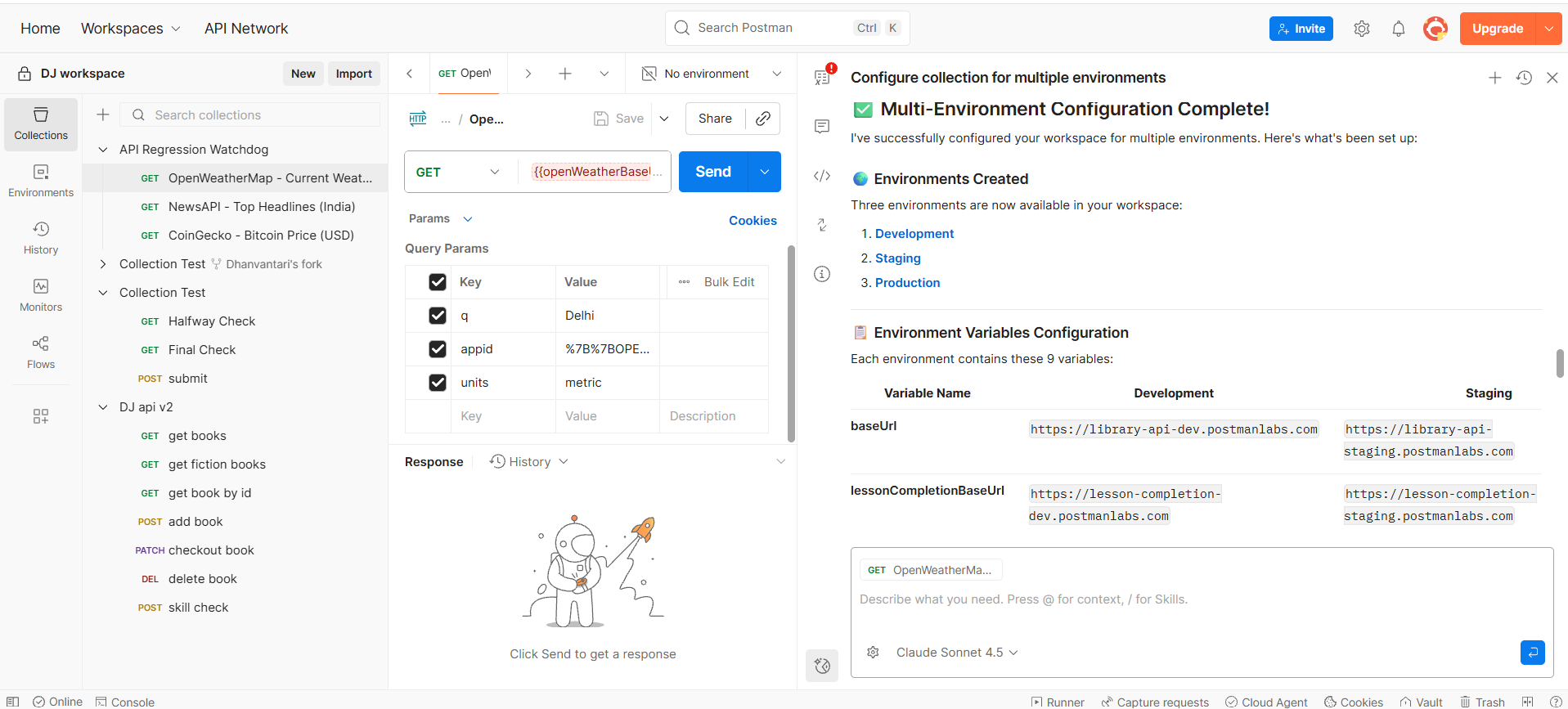
Agent Mode took a messy, single‑environment setup and turned it into a clean, multi‑environment workflow that would have taken me a long time to wire by hand.

In my DJ workspace I had three collections (DJ api v2, API Regression Watchdog, and Collection Test) all hardcoded to specific URLs and keys. The “long way” to fix this would have been: open every request, swap raw URLs for {{baseUrl}}‑style variables, set up separate dev/stage/prod environments, and then remember to update each request to use the right host and API keys. That’s easily half an hour (or more) of clicking through tabs and hoping I don’t miss one.

Instead, I asked Agent Mode to “set this workspace up for multiple environments” and let it drive. It scanned all three collections, read each request (Books API, Skillcheck, CoinGecko, NewsAPI, OpenWeather), and then in one flow it:

  • Created three environments (Development, Staging, Production) with a consistent set of variables for base URLs and secrets.

  • Updated my requests to use variables like {{baseUrl}}, {{lessonCompletionBaseUrl}}, {{coinGeckoBaseUrl}}, {{newsApiBaseUrl}}, and {{openWeatherBaseUrl}} instead of hardcoded URLs.

  • Switched the “submit” and “skill check” requests over to environment‑based auth, and summarized exactly what changed plus what I still need to fill in (real API keys, real dev/stage URLs, and one manual collection‑level auth tweak).

The final summary it generated reads like a mini implementation guide: which environments exist, which variables were added, what each collection now depends on, and which values I must supply before going live. Realistically, that turned a 30–40 minute, error‑prone setup into a single Agent Mode run plus a few minutes of review and secret entry.

That second prompt was meant to use Agent Mode to auto‑generate tests for every request in the collection from the latest “good” responses, turning hours of manual assertion writing into a one‑shot step. Because my API credits ran out before it finished, I couldn’t actually run or include that part in this week’s challenge, but it’s the next workflow I plan to try once credits reset.

1 Like

I work a lot with APIs that power campaign performance dashboards and reporting. Whenever I set up a new version of our analytics endpoints, I repeat the same cycle… create requests, set up examples, write tests, duplicate collections for Prod, update URLs, check status codes, validate responses one by one.
It’s tedious, repetitive, and honestly not something I enjoy doing manually.

So for this challenge, I created a mock collection called Marketing Analytics API – Staging, with endpoints like:

GET /campaigns  
GET /campaigns/:id  
POST /campaigns  
GET /reports/daily  
GET /reports/summary  
POST /login  

All examples were saved, but I intentionally kept Tests empty.
This was my “Before Agent Mode” state.

Then I asked Agent Mode to take over:

“Add automated tests to every request in this collection.
Validate 2xx status codes, generate JSON schema based on example responses, and fail if required fields are missing or types mismatch.
Then clone this collection for production and switch base_url to {{prod_base_url}}.”

Agent Mode understood it instantly. In a few seconds:

  • Added status code checks to every request
  • Generated schema validation tests automatically
  • Created fail conditions for missing fields or type changes
  • Duplicated the full suite into a Prod version without me copying anything manually

What earlier took me ~45 minutes of clicking around, copying scripts, and validating responses request by request… now became a single prompt + a quick review.

Time Saved

Before: 30–45 minutes for full setup
After: 5–10 minutes including verification

Agent Mode basically became my junior QA engineer inside Postman.


This challenge helped me realize how powerful Agent Mode is for automating repetitive setup work. Instead of writing scripts and cloning collections, I can just describe what I want and Postman builds it. This would save hours over months of API changes.

I’m excited to see how others are using Agent Mode too… lots to learn from the community here.

1 Like

My Workflow: Never Calculating an API Signature Manually Again

The Long Way: I was working with a secure API that requires a custom X-Signature header (HMAC-SHA256) for every request. This used to be the most annoying part of my day. To test one endpoint, I had to:

  1. Copy the request body.
  2. Go to an online HMAC calculator.
  3. Paste my secret key and body to get the hash.
  4. Paste it back into Postman.
  5. Get a 401 Unauthorized anyway because the timestamp expired while I was copy-pasting. It was a constant cycle of “Copy, Paste, Fail, Repeat.”

What Agent Mode does in one step: I opened the Pre-request tab and just asked:

“Write a script to generate an HMAC-SHA256 signature using my client_secret and the current timestamp. Add it to the X-Signature header.”

The Result: Agent Mode wrote the full CryptoJS logic, handled the hex encoding, and set the dynamic headers automatically. Now, the signature is calculated perfectly at the exact moment I hit send.

Time Saved: 3 minutes per request →10 seconds. I don’t even think about auth anymore. It turned a complex security requirement into a background process that just works.

1 Like

Thanks to everyone who shared their Agent Mode time-savers this week. Some huge workflow reductions showed up.

We’re reviewing entries now and will announce the winner tomorrow.

If you want to keep the conversation going, join us in Discord → #weekly-challenge and check out the examples people are still discussing.

See you tomorrow for the results :eyes:


Also, do not forget. The December Agent Mode contest is still on, and there are prizes to be won! Show us what you’ve built with Agent Mode in #agent-mode-contest on Discord to stand a chance!

:point_right: Read More about it here

1 Like

Challenge Winner: Congrats to @security-candidate-2!

Using Agent Mode to turn error logs into clean, readable bug reports took the win this week.

Hop over to Discord #weekly-challenge to see the reactions and join the live chat.

3 Likes