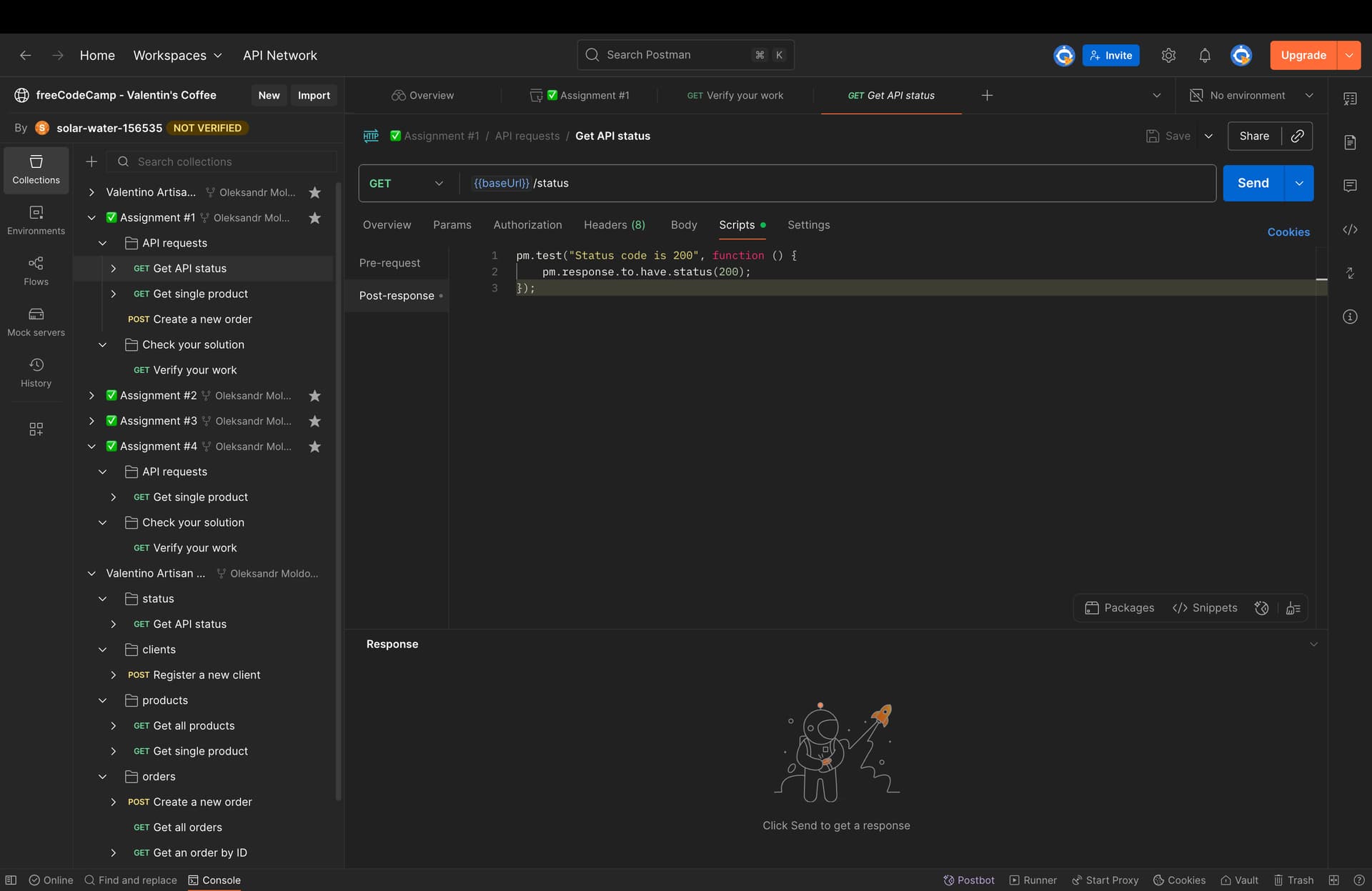
Your submission for the API Test Automation badge failed one or more of the tests.
Please investigate and fix the issues listed below:
Check Assignment 1 - check script: expected ‘’ to include ‘pm.test’
Once you fixed the issues, save all changes and submit again, in order to claim your badge.
Tests are running, still its giving the above error
It’s tricky for anyone to help out without seeing your collection—or at least what you’ve got for Assignment 1.
The error message is actually pointing out what’s wrong:
Assignment 1 is supposed to include some tests, but it sounds like yours doesn’t.
You’ll need to add a pm.test function with your assertion in the Postman response script.
Hello Mike, maybe you can help me with this
Instructions for Assignment #1
-
Get the challenge: Fork the parent collection to your own public workspace.
-
Read the instructions: You will find the tasks you need to complete below.
-
Verify your solution: Select the second folder Check your solution and follow the instructions in the documentation to validate your solution.
Tasks
Task 1
Add to the request “Get API status” a Postman test that verifies the status is 200.
Once you have established that the test is working as expected, duplicate the request and drag it inside the “Assignment #1” collection and put it in the “API requests” folder. Ensure the name of the request remains the same.
Task 2
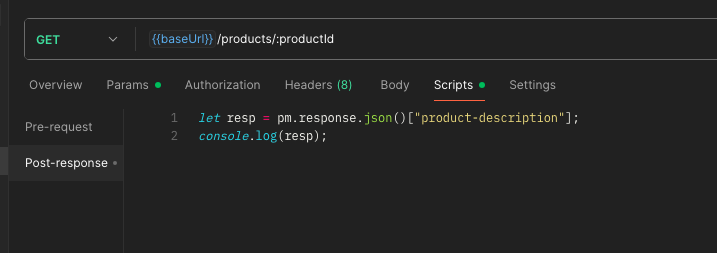
Add to the request “Get single product” a script that parses the JSON response body. Log the value of the property “product-description” to the Postman console.
Once you have established that the script is working as expected, duplicate the request and drag it inside the “Assignment #1” collection and put it in the “API requests” folder. Ensure the name of the request remains the same.
Task 3
Add to the request “Create a new order” a script that parses the JSON response body and sets a Postman variable named orderId with the id of the order that was just created.
Once you have established that the script is working as expected, duplicate the request and drag it inside the “Assignment #1” collection and put it in the “API requests” folder. Ensure the name of the request remains the same.
@vdespa Perhaps you can assist with this as well.
Hey @oleksandrmoldovan
I’m looking closer at these issues and will be able to confirm things tomorrow.
In the meantime, this is what I have in my scripts for those 2 requests, could you trying changing yours and submitting again please?
Could you also confirm that each individual assignment is passing, when using the Verify your work request?
1 Like
Yes, it’s passing. All tests for all assignments
I can send screenshots if necessary
I made some changes, could you submit again please?
Submitted successfully. Thank you very much for your support.
1 Like