🌐 Favorite API in the Network – $150 | 24 Hours Only

The weekly community challenge is live!

Prompt: What’s your favorite API on the Postman API Network?

Tell us what it does and why you love it. Bonus points if you include an example request and response using it in a Notebook.

Whether it’s useful, surprising, or just plain fun, we want to see it in action.

Prize: One winner gets a $150 Postman swag pack.

:star: BONUS :star:
Bonus points could mean bonus CASH. Include a Notebook with a sample request and response using your favorite API will get you into an extra draw for $250 thanks to the Postman Notebook Challenge.

(Oh, and if you create a Notebook, you may as well submit it into the 4-week August Challenge as well and have a triple bite at the prize cherry!)

Deadline: 10am BST Thursday

Reply below to enter. Winner announced Friday. Let’s go.

20 Likes

:fire: Favorite API Name: Notion API

:sparkles: Key Features:

Database Access & Queries
Retrieve, filter, sort, and paginate database content — ideal for structured project management and data dashboards.

Rich Page Content Creation
Supports multiple content block types (headings, text, images, code blocks, lists, embeds, etc.).

Structured JSON Interface
Clean, intuitive JSON structure that mirrors the visual experience of Notion itself.

Integration-Friendly
Works seamlessly with tools like Zapier, Make, Postman, Slack, and custom webhooks.

Secure OAuth 2.0 Authentication
Enables fine-grained access control for user and workspace-level permissions.

:heart: Reasons for Favoritism:

  • Universally Useful: Whether you’re a student, a startup, a writer, or a developer — Notion scales for everyone. Its API makes all this structure programmatically accessible.
  • Turns Notion into a Headless CMS: I can manage website content, documents, and blog posts using Notion as a backend.
  • Productivity Automation Superpower: Combines note-taking, project planning, and database management into a single programmable interface.
  • Built for Builders: Notion’s developer experience is surprisingly smooth, with comprehensive docs, example calls, and community support.

:pushpin: Notable Use Cases:

:white_check_mark: 1. Automated Daily Standup Bot

  • Pull in GitHub issues, PRs, and commits
  • Write summaries into a Notion database
  • Schedule daily updates with Postman monitors

:white_check_mark: 2. Client Onboarding Tracker

  • When a new client signs a form, trigger a Notion workspace setup
  • Pre-fill onboarding tasks, status fields, contacts, and deliverables

:white_check_mark: 3. AI-Written Summaries & Knowledge Logs

  • Use OpenAI + Postman to write summaries
  • Auto-post these to Notion as daily entries, knowledge cards, or internal wikis

:white_check_mark: 4. Content Calendar Manager

  • Feed data from tools like Trello, Jira, or Airtable
  • Centralize it into a Notion editorial calendar for visibility

:white_check_mark: 5. Feedback Dashboard

  • Pull YouTube comments, Discord messages, or survey results
  • Aggregate and analyze them using sentiment scoring, then write a Notion digest for weekly reviews.
7 Likes

My favorite API is OpenAI API

What it does: The OpenAI API gives you access to powerful language models like GPT-4 that can understand and generate human-like text. You can use it for everything from writing code explanations to creating chatbots, generating content, or even building AI assistants.

Why i love it : What really excites me is building agentic workflows with it. Instead of just one-off API calls, I’m chaining multiple OpenAI requests together to create intelligent agents that can research, analyze, and act autonomously. My latest project has an agent that monitors API health, diagnoses issues, and even suggests fixes - all through coordinated API calls.

What makes it special: The API is incredibly versatile. One day I’m using it to explain complex code to junior devs, the next I’m generating test cases for my APIs. Plus, the responses feel natural and not robotic, you can build systems that actually think through problems step-by-step.

8 Likes

Favorite API Name: Google Cloud AI API :cloud:

Key Features :key::

  • Generative AI APIs :sparkles:
    Access groundbreaking large models like Gemini that understand vision, natural dialogue, and code generation—fully customizable through Vertex AI to fit your unique needs.

  • Machine Learning APIs :bar_chart:
    Train and deploy custom ML models effortlessly with AutoML and Vertex AI platforms—removing barriers so anyone can create powerful AI applications.

  • Speech, Text & Language APIs :speaking_head::memo:
    Convert speech to text, generate natural speech, translate across 100+ languages, and extract sentiment or key entities with remarkable accuracy.

  • Image & Video Analysis APIs :camera_with_flash::movie_camera:
    Detect faces, objects, landmarks; perform OCR to read text inside images/videos; moderate content intelligently; and index video repositories for fast search.

  • Document & Data Processing :card_index_dividers:
    Leverage advanced parsers tailored for contracts, loans, invoices, and automate data extraction and complex analytics workflows.

  • Conversational AI & Chatbots :speech_balloon::robot:
    Build rich, contextual conversation agents with intent recognition and generative models using Dialogflow CX—creating interactions that are natural and intuitive.

  • Integration & Security :locked_with_key:
    Seamlessly integrate with BigQuery, Cloud Storage, and other Google Cloud services under enterprise-grade security, featuring strong encryption and OAuth 2.0 controls.

  • Scalability & Cost Efficiency :gear::heavy_dollar_sign:
    Scale from prototypes to global deployments with cost-effective pay-as-you-go pricing and generous free tiers for experimentation.

Reasons for Favoritism :sparkling_heart: :

  • Comprehensive AI Suite :globe_with_meridians:
    The API combines vision, language, speech, and structured data capabilities into a unified ecosystem that solves diverse, real-world challenges.

  • Cutting-Edge Models & Innovation :rocket:
    Access the forefront of AI research with continuously updated state-of-the-art models like Gemini, powering richer, smarter applications.

  • Ease of Use & Developer Support :wrench:
    Managed services, extensive docs, AI Studio prototyping, and curated Postman collections streamline developer workflows, making AI accessible at any skill level.

  • Multimodal & Multilingual Power :globe_showing_americas:
    Supports diverse input types—image, text, audio, video—and bridges language gaps with real-time translation for truly global reach.

  • Security & Compliance :locked:
    Built to meet strict industry standards, ensuring privacy, regulatory compliance, and trustworthy data handling in sensitive fields like healthcare and finance.

Use Cases :

  • Smart Customer Support Bots :speech_balloon:
    Deploy empathetic conversational agents that adapt and learn, enhancing user experience across websites, apps, and messaging.

  • Real-Time Media Analysis & Moderation :movie_camera::warning:
    Automatically identify content, moderate user-generated media, and enable fast search through large video archives.

  • Speech-to-Text & Accessibility Solutions :ear::memo:
    Enable transcription services, voice commands, and accessibility tools that make technology usable by everyone.

  • Multilingual Translation & Globalization :globe_showing_europe_africa::input_latin_letters:
    Break language barriers instantly with accurate, real-time translation integrated into apps and communication platforms.

  • Automated Document Processing & Analytics :bookmark_tabs::robot:
    Streamline workflows by extracting structured data from complex documents like contracts and invoices, accelerating business processes.

  • Creative AI-powered Tools & Automation :artist_palette::high_voltage:
    Use generative AI to create content, code, and marketing copy—fueling innovation and productivity across industries.

Google Cloud AI API doesn’t just add clever features—it fundamentally transforms how we access, understand, and act on information , helping us build a smarter world for everyone. :glowing_star:

5 Likes

this is what i wanted to discuss about because i worked on using the Notion API @navigation-observe27

1 Like

Hi Delbert here.

Most APIs give you data. This one gives you perspective. Every morning, NASA’s APOD API delivers a new piece of the universe — from Saturn’s shimmering rings to a Hubble deep field image showing galaxies billions of light-years away. It’s like opening a daily postcard from space.

Why it stands out:

  1. Inspires curiosity – It’s not just an API; it’s a gateway to the cosmos.
  2. Effortless to start – One simple GET request, and you’ve got the image, description, and metadata.
  3. Rich media + data – You get high-resolution visuals and scientifically accurate explanations in the same response.
  4. Endless creative use cases – Daily wallpapers, classroom space facts, “On This Day in Space” apps, or even AI-generated kid-friendly space stories.

Postman Notebook: Your Daily Space Fix

// Step 1: Fetch today's Astronomy Picture of the Day
const today = pm.sendRequest({
  url: `https://api.nasa.gov/planetary/apod?api_key={{NASA_API_KEY}}`,
  method: 'GET'
});
pm.visualizer.set(`
  <h2>{{title}}</h2>
  <img src="{{url}}" style="max-width:100%; border-radius:8px;">
  <p>{{explanation}}</p>
`, today.json());

// Step 2: Travel back in time (example: Moon landing anniversary)
const apodDate = '1969-07-20';
pm.sendRequest({
  url: `https://api.nasa.gov/planetary/apod?api_key={{NASA_API_KEY}}&date=${apodDate}`,
  method: 'GET'
}, (err, res) => {
  pm.visualizer.set(`
    <h2>{{title}}</h2>
    <img src="{{url}}" style="max-width:100%; border-radius:8px;">
    <p>{{explanation}}</p>
  `, res.json());
});

Pro tip: I automated this with a script that pulls the daily APOD and sets it as my desktop wallpaper. Now my laptop greets me with space every morning.

Why it’s my favorite: The NASA APOD API isn’t just an endpoint — it’s a daily reminder that we’re part of something vast, beautiful, and worth exploring. And with Postman, I don’t just read about the cosmos… I bring it to my screen.

5 Likes

:white_check_mark:API Name: GitHub REST API

:sparkles: Key Features:

  1. Access repositories, commits, pull requests, and issues
  2. Authentication using OAuth or personal tokens
  3. Supports webhooks and live updates
  4. Rate-limited and secure
  5. Massive community support

:heart: Reason to Use:

Being a developer, GitHub is my routine. This API provides complete control to read, watch, and automate workflows — such as monitoring PRs, retrieving contributions, or combining GitHub information in dashboards

:rocket:Notable Use Cases:

  1. CI/CD status monitors
  2. Contributor statistics and leaderboards
  3. Auto-labeling or commenting on PRs
  4. Dev portfolio integrations

:woman_technologist:t2:How I Used It Personally:

I created a developer dashboard that monitors:

1. My GitHub profile details

2. Total public repos count

3. Star count and recent commits on specific projects

4. Open issues on my active projects

I utilized Postman to test every endpoint (GET /users/:username, /repos, /issues) and stored them in one collection with environment variables to be flexible. This taught me how to create a fully dynamic front-end that shows my GitHub activity in real-time.

:brain: Final Thoughts:

The GitHub API is not merely a utility — it’s the portal to the open-source universe. You’re automating contributions, creating your resume website, or executing GitHub-powered CI/CD — this API allows you to do it all from code or Postman.

It’s stable, developer-centric, and supported by excellent documentation and community-friendly support.

13 Likes

As a student who is a beginner at writing tech-based research papers and conduction research in general i find the Google Scholar API extremely useful and it helps me increase my speed and working efficiency along with this it also helps me with-

Easy Paper Discovery: I can quickly search for relevant papers by keywords or topics instead of manually browsing through Google Scholar, making my literature reviews much more efficient

Important Citation Data: The API gives me essential information like author names, publication dates, and citation counts - everything I need to properly cite sources and identify influential papers in my field

Better Research Focus: Instead of spending hours copying and pasting information from websites, I can automate the data collection and spend more time actually reading and analyzing papers for my assignments

Structured Bibliography Building: The organized data helps me compile reference lists more easily while I’m still learning proper academic citation formats

5 Likes

I am a fanboy of the Notion API. I use Notion for everything especially writing down notes from learning.

With the Notion API, you can automate your workflow, create databases, organize, assign tasks for collaboration in a structured manner which is indexable (searchable) all with its API endpoints.

The key features I am drawn to are:

  • The realtime access to comments to give feedback on a note
  • Built with security to give only access to authorized user
  • Populate data from the client-side to the backend (database)

Use Case

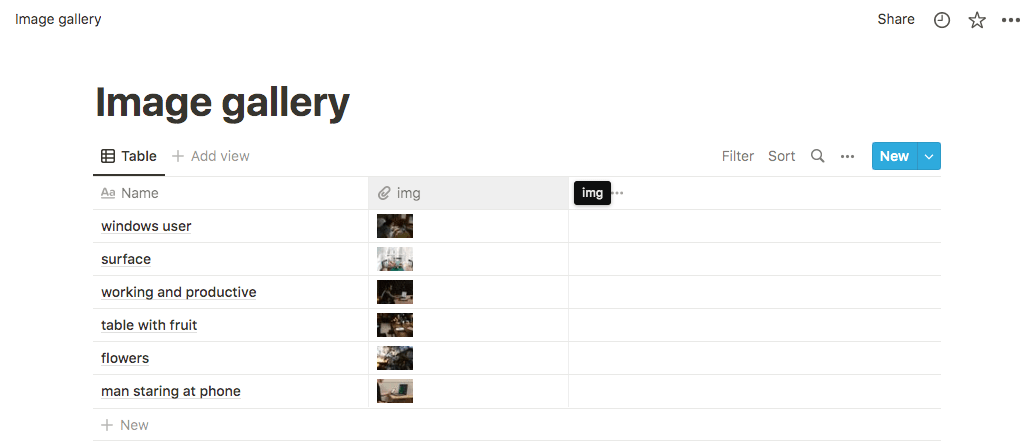
Connect a workspace with a database (image gallery) to allow users send a request back to Notion.

notion database collecting data from a website

Using Notion API in Postman Notebook

9 Likes

:rocket: My Favorite API: SpaceX API (by API Evangelist)

This public API provides real rocket launch data — mission names, crew roles, launch success, and media links. No authentication required!

Why I love it:

  • :unlocked: Open & beginner-friendly
  • :satellite_antenna: Real-time + historical launches
  • :man_astronaut: Crew, missions, webcast links
  • :bar_chart: Clean JSON structure, great for dashboards

Example Request:

GET https://api.spacexdata.com/v5/launches/latest

Sample Response:

{
  "name": "Crew-5",
  "date_utc": "2022-10-05T16:00:00.000Z",
  "success": true,
  "crew": [
    { "role": "Commander" },
    { "role": "Pilot" },
    { "role": "Mission Specialist 1" },
    { "role": "Mission Specialist 2" }
  ],
  "links": {
    "webcast": "https://youtu.be/5EwW8ZkArL4",
    "wikipedia": "https://en.wikipedia.org/wiki/SpaceX_Crew-5"
  }
}

:memo: Notebook Entry:
:backhand_index_pointing_right: Postman

#PostmanCommunity #PublicAPIs #NotebookChallenge

5 Likes

API Name: WhatsApp Business Cloud API (by Meta)

Key Features:

Send and receive WhatsApp messages programmatically

Supports text, images, documents, videos, voice notes

Interactive templates with buttons (Quick Replies, Call to Action)

Read receipts, delivery status, and message IDs

Hosted on Meta Cloud (no local server setup needed)

Works with both business-initiated and user-initiated conversations

Reason to Use:

I used this API to build a WhatsApp notification system for order updates. It’s ideal for reaching users where they are most active. Meta provides a sandbox (test phone number) for free, and it supports secure, real-time communication with global delivery.

Unlike unofficial APIs or browser bots, the Cloud API is reliable, scalable, and legal, and integrates easily with tools like Postman.

Notable Use Cases:

Send order confirmation and tracking updates

Customer support bots or ticketing via WhatsApp

Appointment reminders and rescheduling

Lead generation and follow-ups with interactive templates

OTP and two-factor authentication

6 Likes

Favorite Postman API Network: Datadog

Datadog is my go-to tool for keeping systems healthy, automating monitoring, and making my team’s work easier and more productive.

I love Datadog because it’s not only powerful, but also very flexible. With just a few API calls, you can monitor metrics, set up alerts, track deployments, fetch dashboards, and search through logs. It’s reliable and saves a lot of time, whether you’re working solo or with a team.

To show you how useful Datadog can be, I created a Postman Notebook for the challenge. Inside, you’ll find:

  • A beginner-friendly onboarding guide—so anyone can get started, even if you’re new to APIs
  • Step-by-step instructions for five practical Datadog API endpoints:
    • Querying Metrics (see your servers’ status in real time)
    • Creating Monitors (get automatic alerts before things break)
    • Posting Custom Events (keep everyone informed about deployments or incidents)
    • Fetching Dashboard Details (manage and share dashboards with code)
    • Searching Logs (find errors and troubleshoot quickly)
  • Demo code and sample requests/responses you can run directly in Postman, with explanations for each step

I wrote this Notebook to be simple and clear, so you can copy the requests, run the code, and adapt the examples for your own needs. Whether you’re a beginner or have experience with APIs, you’ll find something useful.

Here’s the link to my Notebook: Notebook
To learn more and explore Datadog: Datadog API

8 Likes

:rocket: My Favorite API on the Postman API Network: NASA APIs

One API that truly stands out on the Postman API Network is the NASA API. It’s not only fascinating and fun, but it also brings the vast universe a little closer to us with just one simple request. :milky_way:

:telescope: What It Does

NASA offers multiple APIs, but my personal favorite is the Astronomy Picture of the Day (APOD) API. It delivers stunning high-definition images of space, along with an explanation written by professional astronomers. Every day, you get something different — from breathtaking nebulae to amazing shots of distant galaxies or even the Earth from space!


:sparkling_heart: Why I Love It

  • Inspirational & Educational – It’s a daily dose of science and beauty.

  • Perfect for Developers – Great for widgets, educational tools, or creative projects.

  • Low Barrier to Entry – Requires minimal setup and gives instant value.

  • Surprisingly Uplifting – In a world full of technical APIs, this one feels magical.


:blue_book: How I Use It

I integrated this API into a fun “Daily Space Inspiration” widget using React. It fetches the image of the day, displays the title and explanation, and updates every 24 hours.


:glowing_star: Final Thoughts

In a world of APIs focused on data, payments, or automation, NASA’s API is a beautiful reminder that tech can be poetic too. It brings space closer to earth and turns any developer into a mini-astronomer.

Whether you’re a space nerd, a curious coder, or just want something unique in your project — this API delivers awe every single day.

14 Likes

My Favorite API on the Postman API Network: TMDB API

TMDB stands for The Movie Database. I find this API enjoyable and particularly useful for junior developers looking to build a catalog application.

Everyone around me knows that I love movies, but whenever I try to find the latest releases or search for a movie to watch, it can be quite challenging to discover a random film that suits my taste.

With TMDB, I can easily search for the latest movies and upcoming releases. Additionally, I can check other people’s comments on a particular film to see if it’s worth watching.

Here is a simple guide on how to use the TMDB API

5 Likes

great :+1: well done !!

4 Likes

My Favorite API: NASA Astronomy Picture of the Day (APOD)

What It Does:
The NASA APOD API delivers a daily dose of cosmic wonder by providing the Astronomy Picture of the Day along with professional astronomical explanations. This API serves up stunning space imagery, from nebulae and galaxies to planets and astronomical phenomena, complete with detailed descriptions written by professional astronomers.

Why I Love It:

  1. Daily Inspiration: Every single day brings something new and mind-blowing from our universe
  2. Educational Value: Each image comes with expert explanations that make complex astronomy accessible
  3. Historical Archive: You can retrieve any APOD going back to June 16, 1995 - over 28 years of space content!
  4. Completely Free: No authentication required, making it perfect for educational projects
  5. Reliable & Well-Documented: NASA’s infrastructure ensures 99.9% uptime

What Makes This API Special:
Unlike typical APIs that serve mundane data, APOD connects us to the infinite cosmos. It’s simultaneously humbling and inspiring perfect for developers who want to add wonder to their applications. I’ve used it in meditation apps, screensaver projects, and educational tools.

Creative Use Cases I’ve Implemented

  1. Cosmic Meditation App: Daily space imagery with calming descriptions
  2. Educational Screensaver: Rotating APOD content for classrooms
  3. Social Media Bot: Automatically posts daily space content with engagement
  4. Desktop Widget: Shows today’s cosmic wonder as wallpaper with explanation tooltip

The NASA APOD API doesn’t just serve data it serves wonder, curiosity, and daily reminders that we’re part of an incredible cosmic story. That’s why it’s not just my favorite API on the Postman Network it’s my daily dose of perspective.

“The cosmos is within us. We are made of star-stuff.” - Carl Sagan

4 Likes

My Favorite API: GitHub REST API

What It Does:

The GitHub REST API lets you automate and interact with GitHub — like creating issues, managing repositories, updating files, fetching commit data, and much more — without needing to do it manually on the website.

Real Use Case:

I used it in a workflow where I needed to automatically create GitHub issues from user-reported errors in Discord. Instead of manually copying errors into GitHub, I built a system using Postman, n8n, and the GitHub API. Here’s how it worked:

  • A user reports a bug or error via Discord.

  • n8n captures that message and sends a request to the GitHub API.

  • A GitHub issue is instantly created with that error info.

This automated the boring part, removed manual errors, and made GitHub the single source of truth for all issues — even those coming from outside contributors or casual chats.

Why I Love It:

  • It’s developer-first — no bloated or complicated stuff.

  • The documentation is clean and complete — I never get stuck.

  • It works seamlessly with other platforms (Postman, Discord bots, n8n, etc.).

To demonstrate this integration, I also created a Postman Notebook with a sample request and response using the GitHub API to create an issue. It shows the exact format and steps I used perfect for anyone who wants to replicate this setup or learn how the GitHub API works in real-world workflows.
Link : Postman

13 Likes

My Favorite API is the Slack Web API

During my internship, I witnessed a problem that many fast-paced tech teams face: important updates were getting ignored.

Our development team worked incredibly hard, often releasing new features or improvements within tight sprint cycles. But when the time came to share those achievements, the announcements were simply posted in Slack often in the middle of unrelated discussions or drowned in message noise. Some people didn’t even know what had launched, and others didn’t get the credit they deserved. It felt like our wins were slipping through the cracks.

That’s when I discovered the Slack Web API and paired it with Postman to solve this in a simple, automated way.

Why I Use the Slack Web API

The Slack Web API lets you send messages, updates, alerts, and more directly into Slack channels using structured JSON requests.

It’s perfect for:

  • Sending automated release notes
  • Sharing real-time project alerts
  • Posting team recognition and thank-yous
  • Scheduling reminders or daily standup messages

Using it with Postman means no code is required, making it easy to test, customize, and automate ,even if you’re not a developer.

How the Slack Web API Solves This

The Slack API automates those critical, repetitive updates right where your team already communicates no more missed news or forgotten kudos.

With just one request in Postman, you can:

  • Keep everyone informed
  • Ensure contributors are recognized
  • Make updates feel exciting and visible

When automation handles the routine, your team can focus on what really matters.

The Impact : The difference was immediate.Team members saw updates instantly, even when busy.

A simple automation using the Slack Web API and Postman helped create a more connected, transparent, and positive team environment ,with no coding required.

Try It Yourself – Sample Request

Here’s a ready-to-use request you can send in Postman:

POST https://slack.com/api/chat.postMessage
Authorization: Bearer xoxb-your-token-here
Content-Type: application/json

{
  "channel": "#dev-updates",
  "text": "🚀 New release is live!",
  "blocks": [
    {
      "type": "section",
      "text": {
        "type": "mrkdwn",
        "text": "*Release:* v3.0\n*Leads:* <@alex>, <@sam>\n👏 Let’s give them a round of applause!"
      }
    }
  ]
}

Response:

{
  "ok": true,
  "message": {
    "text": "🚀 New release is live!",
    "ts": "1722956824.000200"
  }
}

Key Features of Slack Web API

  • Supports text, rich formatting, mentions, buttons, and block layouts
  • Real-time message sending and editing
  • Works with bots, apps, or custom workflows
  • Scales easily for small teams or enterprise use
  • Fully testable with tools like Postman — no code needed

Why I Recommend It

  • Boosts visibility: Everyone sees the updates that matter
  • Improves team morale: Contributors get the recognition they deserve
  • Saves time: Automate repeat messages like releases, standups, or alerts
  • Beginner-friendly: Anyone on the team can use it with Postman

The Slack Web API helped me turn updates into meaningful team moments.
Next time your team ships something big, don’t let it get ignored.

5 Likes

:fire: Favorite API: Shodan API

Shodan is like Google for connected devices. It lets you search for exposed webcams, servers, databases, and more — all across the internet. I love how powerful and eye-opening it is, especially when paired with Postman.

:shield: Whether you’re into cybersecurity or just curious about what’s publicly accessible, Shodan gives you real-time visibility into the internet’s exposed edge.


:blue_book: My Postman Notebook

:backhand_index_pointing_right: Exposed Webcams in India via Shodan API

Includes:

  • A working search query

  • Example request & response

  • Notes on how to customize your search


Shodan + Postman = :high_voltage: cybersecurity automation made simple.

Let me know what you find! :eyes::magnifying_glass_tilted_left:

11 Likes

My Favorite API on the Postman API Network: IP Geolocation API (by ip-api.com)


:compass: This API gives geolocation details (like city, country, timezone, and ISP) by simply entering an IP address — no API key required.


:key: Key Features:

  • Get location info of any IP in real-time

  • Supports IPv4 & IPv6

  • Returns:

    • :globe_showing_americas: Country, region, city

    • :compass: Latitude & longitude

    • :three_o_clock: Timezone

    • :satellite_antenna: ISP & organization

    • :wireless: ZIP code and IP type

  • No authentication or setup needed

  • JSON & CSV output options


:light_bulb: Why I Love It:

  • :white_check_mark: Super simple to use — just hit the endpoint

  • :high_voltage: Fast and lightweight API

  • :locked_with_key: Useful for login tracking, personalization, fraud detection

  • :test_tube: Great for beginners to practice APIs, JSON, and Postman workflows

  • :laptop: Ideal for real-world apps, dashboards, or alert systems


:ledger: My Postman Notebook Includes:

  • :receipt: Dynamic IP input (via environment variable)

  • :test_tube: Tests to check if city, country, and timezone are returned correctly

  • :bar_chart: Visualizer that shows results in a clean table

  • :repeat_button: Bonus: Integration with ipify to auto-fetch your own IP

:paperclip: Notebook Link

Final Thoughts:

  • This API is simple but powerful

  • It’s perfect for quick prototyping, teaching, or enhancing security

  • Great fit for Postman Notebooks and workflows

11 Likes