🏡 $100 Community Challenge – Skills Outside of Work | 24 Hours Only

This week’s community challenge is about the ways you use your technical skills when you’re not on the clock.

What’s one way you’ve used your tech skills to help with something outside of your day-to-day work?

It could be:

  • A script, automation, or spreadsheet you built for a hobby
  • A small tool or setup that saved you time in your personal life
  • A side project or quick hack that solved an annoying problem
  • Something scrappy you put together just to make life easier

How to enter
Reply to this thread with:

  • What you were trying to do
  • What you built or set up
  • Why it mattered to you

How we’ll pick a winner
We’re looking for entries that are personal and specific. Sharing what didn’t work at first or what surprised you helps your entry stand out.

Screenshots, snippets, or links are welcome, but not required.

Prize
:money_bag: $100 cash

Deadline
Thursday, Jan 15, 2026 at 10:00 am BST / 2:30pm IST

Winner announced Friday :eyes:

6 Likes

I treated my interview prep like a production system — automated ingestion, vector storage, LLM orchestration, and failure handling included.

What I was trying to do
Outside my day job, I wanted a repeatable, low-noise DevOps learning pipeline focused on NVIDIA, platform engineering, and infra — without manual browsing or generic newsletters.


What I built or set up
I designed a local-first AI automation stack:

  • FastAPI backend (RAG + planning APIs)

  • Streamlit UI

  • ChromaDB for embeddings

  • Ollama with small CPU-friendly models

  • n8n for cron-like workflows and email delivery

  • Docker Compose with persistent volumes for portability

At 06:00 IST daily, the system:

  • Pulls DevOps-relevant NVIDIA blogs via RSS

  • Filters and embeds content

  • Generates a time-boxed DevOps study plan

  • Sends a curated newsletter to my inbox

All data persists across restarts and machines.


Why it mattered to me
This project forced me to solve real infra problems:

  • Memory limits and model selection to avoid OOM kills

  • Container image size reduction using distroless

  • ABI mismatches between Python builds and base images

While debugging this, I reported and raised a fix for an ABI mismatch issue in Google’s distroless container images, because my backend failed only in distroless environments.

That contribution was unexpected — but it validated the project as real engineering, not a toy.

Today, the system runs daily and keeps my learning structured without effort.

1 Like

That’s cool @kaushalacts, could you share an example image of what the output looks like?

What I was trying to do
I wanted to help Pakistani and Indian students who struggle to understand English lectures, especially YouTube classes. Many students understand concepts better in Urdu/Hinglish, but most learning content is only in English.

What I built or set up
With my team, I built Education Bridges — a web tool where students paste a YouTube lecture link and get:

  • A simplified summary in Urdu + Hinglish (Urdu-English mix)

  • A translated audio version they can play instead of the original English audio

We tried multiple translation and TTS APIs. At first, the Urdu audio was too pure/formal and hard to understand. After testing and failing, we intentionally shifted to a WhatsApp-style Hinglish/Urdu-English tone so it feels natural and easy.

Why it mattered to me
I’ve seen students miss good education just because of language barriers. This project felt meaningful because it bridges the gap between English content and local understanding.
Students can now listen to lectures comfortably, understand faster, and learn with confidence — without feeling left behind.

What surprised me most was how small language choices made a huge difference in accessibility.

1 Like

That sounds like a great resource for students @mushiifatima3456!

Is there a public link to the project that you wanted to share for others to use?

As part of my learning journey outside of regular work, I challenged myself to build a small but meaningful project within a limited timeframe. Instead of focusing on something big, I wanted to create a tool that encourages curiosity, exploration and makes my work productive. That’s how Skill Searcher came to life—a simple web app built to explore skills easily and intuitively, while I was taking note of all the things that could work properly, so that I can easily go through all the skills that I want to study without going to different places or platforms and getting confused.

Live Project: https://skills-selector-db.netlify.app/


What I was trying to do

I wanted to build a lightweight skill discovery tool that helps users explore different skills without noise or complexity.
The idea was simple:

  • No login

  • No overwhelming UI

  • Just search, filter, and explore skills

I wanted something I personally could use when thinking about what to learn next — beyond just career requirements.


What I built or set up

I built Skill Searcher, a frontend web application that allows users to:

  • Search skills dynamically

  • Filter results in real time

  • Instantly view relevant skills

  • Use a clean and distraction-free interface

Technical setup included:

  • React for component structure and state management

  • API-based data fetching for skills

  • Client-side filtering logic

  • Deployment on Netlify for quick public access

The focus was not just on functionality but on a smooth user experience.


What did not go well at the start (and how I fixed it)

This project did not work smoothly at first—it took 5–6 iterations to get things right.

Filtering logic issues

Initially, filtering didn’t work as expected:

  • Empty results were returned

  • Case sensitivity broke the matching:

  • Filters ran before API data was fully available

How I overcame it:
I normalised both user input and API data, ensured state updates were completed before filtering, and restructured the logic to run only after data was loaded. To make the filtering work successfully to deal with the casing of characters, I followed the code:

const filteredSkills = SkillsData.filter(skill => {
    const matchesSearch = skill.name.toLowerCase().includes(searchTerm.toLowerCase()) ||
                         skill.category.toLowerCase().includes(searchTerm.toLowerCase());
    const matchesCategory = selectedCategory === 'All' || skill.category === selectedCategory;
    return matchesSearch && matchesCategory;
  });

API fetching and response handling problems

While I was testing out the API over Postman, I got many issues, and I struggled with:

  • 404 Not Found Due to incorrect endpoints

  • 500 Internal Server Error from malformed requests

  • undefined data caused by incorrect response assumptions

Even when the API responded, nothing rendered on the UI.

How I overcame it:
I logged the raw responses, carefully studied the JSON structure, and rebuilt the response mapping instead of guessing. I also added defensive checks to avoid UI crashes.


Multiple rebuild attempts

I had to refactor:

  • Data flow

  • Rendering logic

  • Filtering conditions

Several times before, everything worked together smoothly. Each failed attempt improved my understanding of state, async behaviour, and data reliability.


Why it mattered to me

This project really solved my problem, as all the resources to study for each type of skill were present in the same place, such as blogs and YouTube channels, while I was preparing for my interviews. This project also reminded me that real learning happens when things break.

Skill Searcher helped me:

  • Improve debugging skills

  • Better understand API responses

  • Learn patience and persistence

  • Build something useful outside of work pressure

Although I know there could be many improvements I could make, such as a fallback template or code and good interactivity, more than the final product, the journey—failing, fixing, and finally making it work—is what made this project valuable to me, and it helped to make my work productive and easy.

1 Like

I didn`t build an LLM or anything complex. I built a simple to-do app that runs locally on my machine and reminds me about things like pushing code, college work, and daily DSA practice.

I created it because I wanted something lightweight and distraction-free. Most existing to-do apps felt too heavy, full of notifications and features that pulled my attention away instead of helping me focus. This one does exactly what I need—no more, no less.

It helped me stay consistent with my work and reduced the mental load of remembering small but important tasks. Because it runs locally and is very simple, I actually use it every day instead of ignoring it like other apps. Building it also motivated me to work more regularly and stay disciplined with my practice.

1 Like

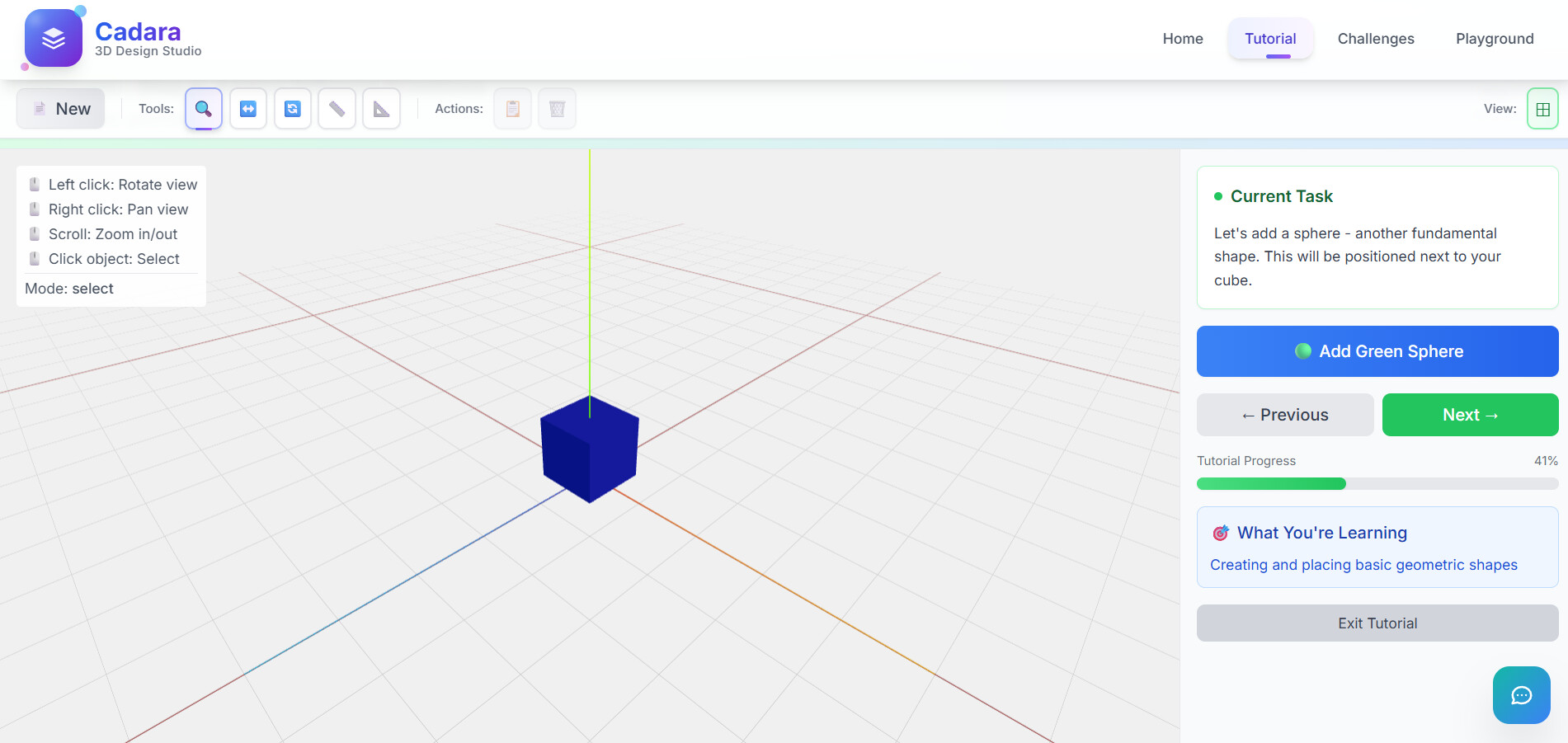
Recently, I participated in a hackathon, my idea was to build a CAD application that anyone could use.

Most CAD and 3D design tools are heavy, expensive, locked behind licenses and demand powerful hardware. That makes learning 3D inaccessible for many beginners. I wanted to change that by building a browser based CAD learning platform that works on everyday laptops and removes cost and setup barriers entirely.

I built Cadara, a lightweight, web based 3D design education platform using React and Three.js. Instead of passive tutorials, users learn by directly interacting with 3D objects in real time.

To make learning smarter, I integrated AI as a contextual guide. Cadara analyzes how users interact with the 3D scene and when someone asks “What went wrong?” or “How should I do this?”, the AI gives precise, step by step feedback highlighting mistakes like incorrect transform order or missed alignment steps.

Postman was a core part of my workflow. I used it extensively for API testing, AI prompt iteration, and response validation, allowing me to quickly experiment, debug and refine AI behavior without slowing down frontend development. Under hackathon time pressure, Postman helped me ship confidently and reliably.

I’ve personally struggled with learning 3D tools not because the concepts were hard, but because the software felt intimidating and inaccessible. Cadara is the platform I wish I had when I started: free, beginner-friendly and designed to lower the first barrier into 3D.

The biggest challenge was performance. Early versions of Cadara were slow and laggy and making a 3D web app lightweight without sacrificing interactivity forced me to deeply understand Three.js rendering and optimization. I entered the hackathon with basic Three.js knowledge, but finished with real, hands on experience building efficient, production ready 3D systems.

Cadara started as a hackathon idea, but it became proof that with the right tools and solid API testing workflows you can make complex skills accessible to everyone.


1 Like

My wife always wants to know, to some extent, where we’re at financially in a given month (with the budget, etc.), but she dislikes actually checking the bank account. I configured a little e-ink display (Raspberry Pi: Simple Waveshare e-paper dashboard with weather and calendar ← followed this tutorial) that can communicate with the internet. Then periodically I run our credit card transactions through a categorizer and I just hardcode upper limits.

On the display, I just show in a given month how much we’ve spent on, for example, food, as a percentage of our budget for that month. When she walks past it in the kitchen, she gets the exact information she’s looking for, at a glance!

1 Like

What I was trying to do

  • Over time I started noticing a pattern in colleges today.
    Students are talented and they work hard, but many of them still struggle during placements because they do not know the exact preparation path. Most of them search interview experiences on the internet, but those are often old or not relevant to how companies are hiring right now.
  • I wanted to create something that gives students fresh, reliable and college-specific placement guidance instead of random outdated information.

What I built

  • I built a full web platform called Primarykey.
  • Students can log in and read interview experiences shared by seniors who actually got placed, download company-wise preparation material, take quizzes, and compete on a live leaderboard.
  • Placement admins can add companies visiting the campus, post announcements, upload preparation kits, create quizzes, and track how students are performing.
  • I deployed the platform on Railway cloud and handled everything myself including hosting, authentication, database, and subscription setup.

Why it mattered to me

  • This was something I built completely outside my job.
  • After my workday ended, I spent almost every evening from around 6 to 9 or 10 for nearly two months working on this. I also worked on weekends. I kept taking feedback from students, fixing what was confusing, improving what was slow, and adding features that actually helped them prepare better.
  • I built and launched the first working version within about 20 days, but that was only the beginning.
  • Over the next two months, I kept improving it after launch by fixing issues, adding features, and refining the product based on real student feedback.

User Issue Resolve and Feedback

post link

What I am sharing

  • I am attaching screenshots of the student dashboard, admin panel, interview experience section, and leaderboard to show how the platform actually works.
  • Everything here was built in my free time by taking real student feedback to solve a problem I saw in today’s college placement system.

Technical skills I used outside my day job

  • While building Primarykey outside my regular job, I used a completely different tech stack from what I normally work with.
  • I built the backend using Node.js and Express.js, designed APIs for quizzes, users, companies and interview experiences, and managed the entire database using MySQL Workbench.
  • I also handled cloud deployment, authentication, and performance tuning on Railway. This project pushed me to learn, debug, and scale a real production system on my own, far beyond what I use in my day-to-day work.

User Dashboard Screenshots

Admin Dashboard Screenshots

Only the key pages of the platform are shared in the screenshots for privacy and clarity. Since Primarykey is college-specific and does not have public sign-up, access is created by the admin through the database, and I am happy to share a demo username and password privately if the reviewer would like to explore the full admin and student walkthrough.

primarykey

Explainer Video

1 Like

What I was trying to do
I wanted a simple but honest way to track my mental health, habits and finances over time instead of relying on memory. I needed something I could use daily and look back on years later.

What I built
I built a custom Excel spreadsheet where I log my mood every day using colors and write short notes about my day. Over time, I added formulas that automatically calculate summaries, trends and yearly overviews for habits, emotions, and spending.

One challenge was that Excel doesn’t natively support formulas based on cell colors. At first, nothing worked the way I wanted. I had to research workarounds, experiment with scripting and different solutions to detect color patterns and convert them into usable data. That process taught me a lot about Excel automation and problem-solving.

Why it mattered to me
This spreadsheet became part of my daily routine for several years. It helped me understand my mental health better, recognize patterns, and reflect on my progress.
Looking back at my data, I realized I actually had a really good 2025 because most of the year is marked with my “nice” mood color. Seeing that visually was surprisingly emotional and motivating for me.

What surprised me
I didn’t expect a simple spreadsheet to become such an important personal tool. It’s not fancy, but it genuinely changed how I reflect on my life and growth.

Without going too much into my personal details, here is how my last 2 years have looked with colors!


1 Like

Outside of my regular studies, I used my tech skills to solve a small but recurring problem in my daily life.

I was trying to keep track of my learning progress and daily habits (coding practice, running, and content creation), but using separate notes and reminders wasn’t working — I kept forgetting or losing consistency.

So I built a simple system using a spreadsheet combined with small scripts and basic automation to log daily activity, track streaks, and highlight gaps. It wasn’t fancy, and my first version was too complicated to maintain, so I simplified it to focus only on what I actually needed.

This mattered to me because it helped me stay consistent and intentional with my time outside of work and college. It showed me how even simple, scrappy technical solutions can make everyday life easier and more structured.

1 Like

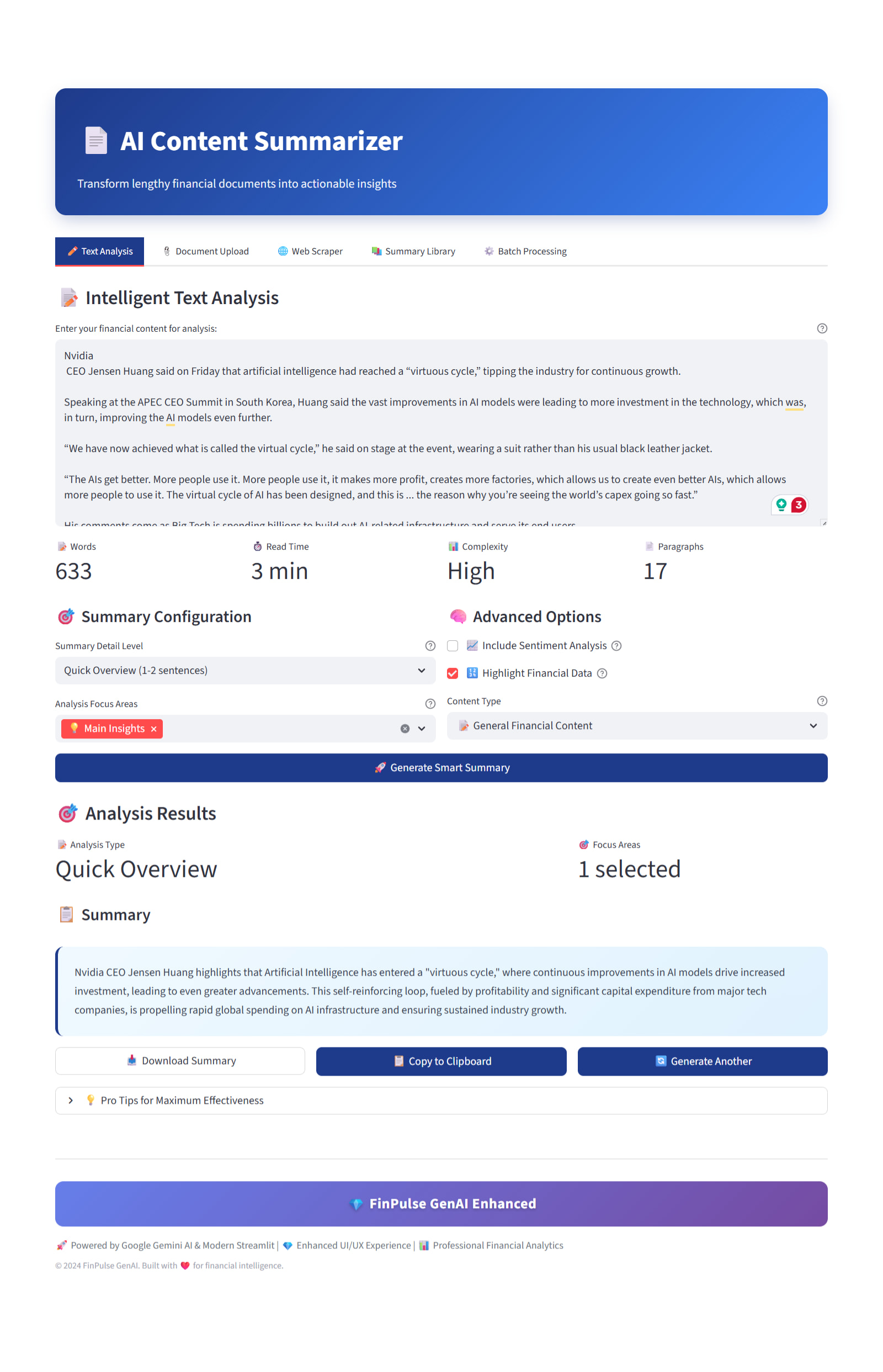
FinPulse GenAI

What I was trying to do

I wanted to challenge myself to build something outside my regular work, under a strict time limit, and see how far I could push an idea end-to-end. Instead of creating a small demo or a single feature, I asked myself:
What would a real person actually need when thinking about money?

Most tools solve only one problem at a time: budgeting, investing, or learning, but in real life, all of these are connected. My goal was to explore whether I could stitch those pieces together into one meaningful experience using AI thoughtfully, not just as a buzzword.

What I built or set up

I built FinPulse GenAI, a personal finance platform made up of several connected parts:

  • An AI financial planning wizard that collects user inputs (income, expenses, risk, goals) and generates a personalized plan

  • A goal tracker for things like emergency funds and retirement, with progress, timelines, and insights

  • Scenario analysis and long-term projections to visualize different investment outcomes

  • Indian financial calculators (SIP, EMI, tax-saving, wealth growth) with real numbers and projections

  • A financial quiz section to help users improve financial literacy

  • An AI content summarizer that turns long financial articles into simple, actionable takeaways. Everything was built as one flow, not isolated features.

    What didn’t work at first (and what surprised me)

    A lot, honestly.

    Initially, the AI outputs felt “smart” but not grounded enough, so I had to rework them to be tied to real calculations and rules.
    Connecting multiple modules into one experience caused data and logic issues that I didn’t expect.
    I also underestimated how much time UX and clarity would take compared to writing the logic itself.

    What surprised me most was that the hardest part wasn’t AI; it was making the product understandable and useful.

    I didn’t aim for perfection;

    I aimed for progress. That mindset helped this project reach 4th place in the hackathon. While I received a participation certificate rather than a prize, the results were based on a graded marking system, and I missed the 3rd rank by just 0.5 marks.

    Still, I’m genuinely happy. The experience, learning, and validation mattered far more to me than the outcome. This challenge pushed me to build something meaningful, outside my comfort zone, and something I’m truly proud of.

    Note: I’ve attached a few screenshots to give a better sense of the flows, features, and overall experience I built during the challenge.

  
3 Likes

It’s nothing big, but it already saved me a lot of time.
I wanted to reduce the time I spend every month categorizing my business transactions. Doing it manually meant a lot of copy-pasting and proofreading, which became quite annoying and I was not looking forward to it every month.

So I used my coding skills and wrote a small Python program to semi-automatically classify my transactions. I started in a Jupyter Notebook, testing different patterns and rules, and then turned it into a proper Python script. At first, I tried to fully automate the classification, but I ran into some issues. Patterns that worked fine for one type of transaction caused incorrect matches for another. Because this is sensitive financial data, I decided to make it semi-automatic, so I still have some control over the data.

This program reduces the time I need for my administrative business tasks and I’m glad I invested the time to build it.

I might add more features to it in the future, but for now it serves it’s purpose really well.

1 Like

What I was trying to do
I was applying to roles across multiple ATS portals (Workday, Greenhouse, Lever, etc.) and kept losing track of:

  • what I applied to (and where)

  • which resume version I used for each role

  • when I should follow up (7/14-day cadence)

  • and I even double-applied once or twice because confirmations were buried in my inbox

On top of that, I was spending extra time manually tailoring resumes and writing follow-up notes.


What I built / set up
I built a personal automation tool called ApplicationOps that turns the whole process into a repeatable workflow: receipt → tracking → tailoring → follow-up.

Core pipeline

  • Gmail filter + label: automatically tags application confirmation emails

  • Python worker on Ubuntu: pulls only new labeled emails on a schedule

  • ATS-aware parsing: extracts company / role / source / link using rules/templates first

  • SQLite as source of truth: prevents duplicates, keeps history, supports quick queries

  • Google Sheet mirror: “human-friendly” view for edits, status changes, and notes

Follow-up automation

  • Auto-calculates and stores:

    • Follow-up date (7 days)

    • Stale date (14 days)

  • Sends a Telegram push for every new application logged

  • Creates a Google Calendar event for the follow-up date so it shows up in my day plan

AI layer (only when needed)

  • If parsing is messy or fields are missing, it uses an AI fallback (OpenAI) to:

    • infer missing company/role from email body

    • classify job family (Backend / Fullstack / ML / DevOps)

    • assign a confidence score and mark items Needs Review when uncertain

  • Optional add-on: generate a short resume tailoring checklist + a quick follow-up draft message

Weekly “career ops” digest

  • Every Sunday it queries SQLite and sends me a Telegram summary:

    • follow-ups due this week

    • stale applications to nudge

    • “Needs Review” items to fix

    • a short suggested action list (AI-generated)


Why it mattered to me
It removed a huge amount of mental load and busywork. Instead of hunting through emails and spreadsheets, I have a system that:

  • logs everything consistently

  • prevents duplicates automatically

  • reminds me at the right time

  • and keeps my tailoring/follow-up process disciplined
    The end result is less stress, less wasted effort, and better follow-through.


What didn’t work at first / what surprised me
The hardest part wasn’t the code — it was how inconsistent confirmation emails are. Some subjects don’t include the role, some hide key details in HTML, and each ATS has a different template. My first “regex-only” approach produced wrong fields, so I switched to:
deterministic extraction first → AI only as fallback → confidence + Needs Review instead of bad data.

Mini snippet: SQLite schema + “rules → OpenAI fallback” extraction

SQLite (source of truth + dedupe)

CREATE TABLE IF NOT EXISTS applications (
  id INTEGER PRIMARY KEY AUTOINCREMENT,
  applied_date TEXT NOT NULL,
  company TEXT NOT NULL,
  role TEXT NOT NULL,
  source TEXT NOT NULL,
  message_id TEXT NOT NULL UNIQUE,
  link TEXT NOT NULL,
  status TEXT NOT NULL DEFAULT 'Applied',
  followup_7d TEXT NOT NULL,
  stale_14d TEXT NOT NULL,
  needs_review INTEGER NOT NULL DEFAULT 0,
  extraction_method TEXT NOT NULL DEFAULT 'rules',
  ai_confidence REAL NOT NULL DEFAULT 0,
  job_family TEXT NOT NULL DEFAULT ''
);

Hybrid extraction (rules first, OpenAI only when uncertain)

company, role, needs_review = parse_rules(subject, sender, body)
source = detect_source(sender, body)
link = first_link(body)

extraction_method = "rules"
ai_conf = 0.0
job_family = ""

if AI_ENABLED and (needs_review or not company or not role):
    ai = ai_extract_openai(subject, sender, body)  # returns JSON
    company = company or ai["company"]
    role = role or ai["role"]
    link = link or ai.get("link", "")
    job_family = ai.get("job_family", "Other")
    ai_conf = float(ai.get("confidence", 0))
    extraction_method = "hybrid"

    if ai_conf >= 0.72 and company and role:
        needs_review = False

Auto-follow-up cadence (7 / 14 days)

today = date.today()
followup_7d = (today + timedelta(days=7)).isoformat()
stale_14d   = (today + timedelta(days=14)).isoformat()

1 Like

Thank you so much! :blush:
At the moment, the project isn’t publicly live because it relies on paid translation and TTS APIs, and our cloud credits are limited.

We do have a local demo and recorded walkthrough from when the project was completed. We’re actively working on making it cheaper and hopefully free, and our goal is to launch a public version in the next couple of months.

1 Like

During my last job search, I realized I was spennding most of my time re-typing my resume into Workday forms after already uploading it. It felt like busywork instead of real skill evaluation, so I decided to fix it.

I built a small, context-aware Python tool using Playwright and a local Llama 3 model. It reads the job description directly from the page, compares it with my “Master Experience Doc” (a single document containing all my past projects), and selects the three most relevant bullet points instead of blindly autofilling everything.

This reduced a 20-minute form-filling task to about 30 seconds. More importantly, it stopped the process from draining my energy. Instead of mindless repetition, I was back to building and reviewing a system I actually controlled.

I also learned a hard lesson along the way. When I removed the review step, the AI overstated my experience and I had to correct it during an interview. That made one thing very clear to me: automation is powerful, but only when a human stays in the loop.

The screenshot above shows the actual runtime logs from the script. I’ve shared the complete script in the Postman Discord server helpdesk channel as well. If this helps save even a little time during your job search, feel free to use it.

1 Like

What I was trying to do
I wanted a simple way to track how much I was spending on daily food + small purchases without manually typing things. I kept telling myself I’d remember, but I never did and it annoyed me later when checking expenses.

What I built or set up
I made a tiny script + Google Sheet integration where I could log expenses from my phone through a quick shortcut. It auto-categorizes items (food, travel, random, etc.) and updates totals. The first attempt was unreliable - wrong categories and sometimes duplicated entries. After tweaking it with basic regex rules and a simple fallback prompt, it finally started behaving.

Why it mattered to me
Two reasons:

  1. It stopped me from pretending small purchases didn’t exist.

  2. It actually changed my habits - I realized 70% of “random spending” was late-night snacks, so I cut that down. Also kind of satisfying to see the spreadsheet fill up by itself instead of me doing accounting manually.

What surprised me was how much friction it removed just by reducing taps. If something takes more than ~5 seconds on mobile, I’ll forget or skip it - so automating that part was the win. Not a big side project, but it made everyday life easier, and that felt good.

1 Like

What you were trying to do
I needed a simple way to save YouTube videos to my computer for offline viewing. I didn’t want to rely on browser extensions or sketchy download websites.

What you built or set up
I wrote a basic Python script using the yt-dlp library. It runs in the terminal. When I paste a URL, it fetches the highest quality stream, merges the video and audio using ffmpeg, and saves the file to my current directory with a clean name.

Why it mattered to you
It saves time and keeps my files organized. Instead of manually managing downloads or dealing with ads in a browser, I can just run one command and have the video ready to go.

1 Like

I used to be a junior developer at a company where I used to work on sharepoint application. Thought having a experience might make it easier to find another job oh boy was I wrong!

During one such interview was this interview bot that I came across, which took interview based on the resume (I didn’t sit the interview personally) . Thus I wanted to replicate the same (its not finished yet! but work in progress is some work!)

  • What you were trying to do: Create a bot that goes through your resume, verifies the information specifically about the achievements and awards! It also parses through your mentioned projects which will be used to ask question in the next step!

  • What you built or set up: It is not open to public use yet! but you can replicate the RAG application through my github (I am still working on how to deploy it!)

  • Why it mattered to you: I dug into this project because it had all that I need to learn: RAG, API integration, API development! learning these skills have improved my understanding of the more advance tech (agentic ai)

You can check this out here: GitHub - stargalax/resume-verification-system-using-RAG

and I am open to suggestions to improve the system!

1 Like